

How interactive catalogs solve complexity, boost conversions, and reduce friction in the sales process. In this article, we’ll break down what a 3D product catalog is, why it matters in modern e-commerce, and how companies are using it to improve engagement and conversions – especially when traditional catalogs fall short.
For many B2B businesses, a catalog is more than a showcase – it’s how they explain their product. But in industries where a single item can have dozens of configurations, accessories, and dependencies, standard product photos or static listings simply don’t scale. Take professional kitchen equipment, for example: swapping out control panels, feet, side units, or power specs creates hundreds of possible combinations. Photographing them all is unrealistic – and it leaves customers with questions they have to ask a sales rep directly.
According to a report by Business Research Insights, the global market for 3D and AR visualization in e-commerce is expected to grow from $0.34B in 2024 to $2.33B by 2032. Businesses are moving fast to stay competitive.
What makes a 3D product catalog different?
3D catalogs let your customer interact with the product, not just look at it. Users can rotate models, view internal components, or test different configurations right in the browser – with no calls, no back-and-forth. This shortens the decision cycle, increases time-on-page, and builds trust – because buyers see exactly what they’re getting.
We partnered with a commercial kitchen equipment manufacturer whose products had over 20 configuration options. After launching the 3D catalog: time spent per product page increased significantly and Lead submissions rose by 30%.
This wasn’t about flashy visuals. It was about solving a real sales challenge: how to present complex products clearly and efficiently.
How a 3D Catalog Works – From Model to Website
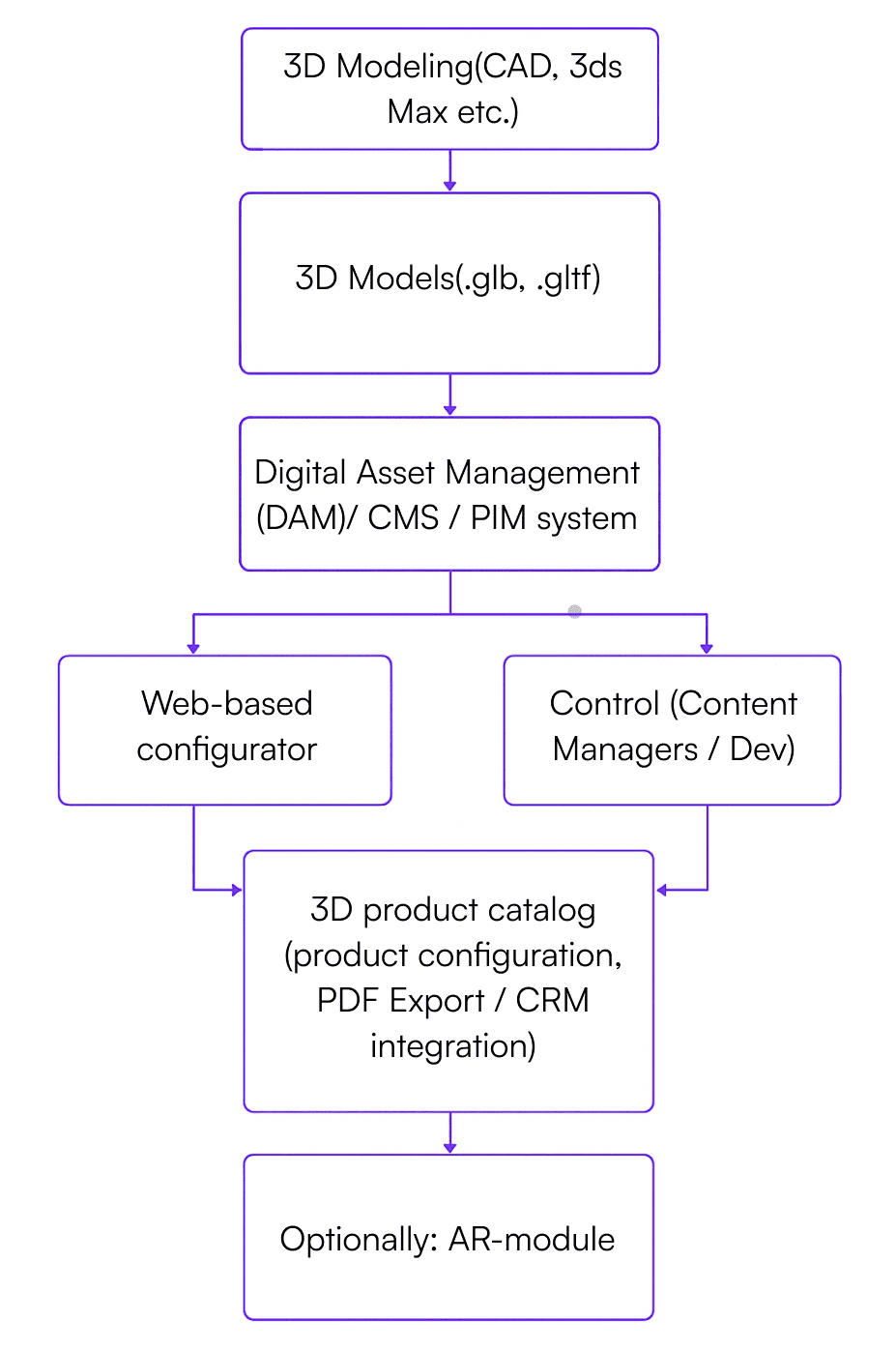
Implementing a 3D catalog requires three core components: the 3D model itself, a system to manage it, and a product configurator that ties everything together on your website.
1. The 3D Model This is a digital twin of your product – built by a 3D designer using CAD files, tech specs, or reference photos. A good model isn’t just accurate – it’s modular. Each part (legs, control panel, housing) is separated into layers that can be swapped or toggled dynamically. Common file formats: .glb, .gltf, .usdz These formats work in modern browsers and support real-time rendering with WebGL or AR functionality.
2. Digital Asset Management (3D DAM) Once you scale past a few models, you’ll need a Digital Asset Management system (DAM) specifically designed for 3D content. This is where your models live, evolve, and stay version-controlled. A 3D ready DAM helps you: - organize model versions (i.e., product generations); - manage textures and materials (steel, glass, plastic); - attach key metadata (dimensions, specs, energy consumption); - deliver models via API to your website or configurator.
3. The Configurator and Web Catalog
Once the 3D model is live, it's embedded in your product catalog through a web-based configurator. This is the interface where the customer builds what they need:
- select configurations or accessories;
- change color, size, layout options;
- preview the result in 3D instantly.
It can be integrated into Shopify, Bitrix, headless CMS, or custom setups using React/Vue. Iframe integrations are also possible. You can also add a PDF export, pricing summary, or downloadable configuration file – streamlining handoff to your sales team.
What Businesses Gain
A 3D catalog doesn’t replace your sales manager – it makes their job easier. Customers arrive better informed, already familiar with product configurations and options. That saves time, especially when the product is technically complex or has a steep learning curve.
Building a 3D catalog isn’t a plug-and-play tool. It’s a multi-stage process that involves design, product knowledge, and technical implementation. Here’s what that typically looks like.
Step 1: Prioritizing the Product Range
The first step is identifying which products are worth modeling first. You don’t need to visualize your entire catalog right away – often, starting with 10–15 high-impact SKUs is enough to validate the model and see results. At this stage, the team defines which products to include, gathers technical specifications (dimensions, materials, variants), and outlines configuration logic – what can and cannot be changed. What’s needed: access to engineering documentation and input from product managers or engineers.
Step 2: Creating the 3D Models
Based on the collected data, 3D designers create lightweight, interactive models optimized for fast loading – especially critical for browser and mobile performance.
Models include core components and customizations (like handles, legs, or finishes). Compatibility with WebGL and AR is checked, and file size is reduced without sacrificing visual quality. Typical turnaround: 3–10 business days per item, depending on complexity.
Step 3: Setting Up Model Management (DAM)
Once the number of models grows, you’ll need a Digital Asset Management (DAM) system – either a commercial platform or a custom setup. This ensures order, scalability, and centralized control over 3D content. DAM helps you manage versions, attach metadata (like dimensions or material specs), and make assets available to configurators or CMS platforms via API.
Step 4: Integrating the 3D Configurator
With the models complete, they’re connected to a web-based configurator. This is where the customer can explore the product, apply options, and see updates in real time. The configurator is embedded in your website or digital catalog. Logic is added for option availability, pricing, and discount rules. UX is tested for responsiveness and mobile performance. Extras like downloadable PDFs or CRM integration can be added to streamline sales workflows.
Step 5: Testing and Launch
Before going public, the system is tested internally to ensure accuracy and performance. Teams simulate different user flows, gather feedback, and validate product logic. Then, the catalog is launched – either publicly or in demo mode for internal review.
Step 6: Analytics and Iteration
After launch, it's important to monitor how users interact with the catalog. This data guides UX improvements and supports ROI calculations.
Behavioral analytics are connected to track engagement, clicks, and lead conversions. User feedback is collected for new features or additional models. The system can then be scaled across product lines. Depending on scope, an initial working prototype can be ready in 4–8 weeks. Full integration into the product catalog usually takes about 3 months – but the project can be launched in stages: one product or category at a time.
AR and 3D in E-commerce: How Do They Work Together?
3D models are the foundation of interactive product visualization. They allow users to rotate, zoom in, and configure a product directly in the catalog – all inside the browser, no plugins required. This creates a more engaging experience by turning passive scrolling into active interaction. Augmented Reality (AR) takes it a step further. With AR, users can place the product in their real-world environment using a smartphone or tablet camera. For example, a customer can point the camera at the floor and instantly see how a commercial oven or coffee machine would look in their kitchen, restaurant, or showroom. To enable this, the same 3D model is used – just exported in AR-ready formats: .usdz for iOS and .gltf/.glb for Android and most browsers.
The typical flow looks like this:
- The user configures the product in the 3D configurator.
- The final assembly is saved.
- A “View in your space” button appears.
- The AR module launches and displays the configured model in the real-world space through the device camera.
This is especially useful for non-standard, large, or high-precision equipment where spatial planning is critical. Industries already benefiting from AR include:
- Industrial equipment: evaluating fit within installation zones.
- Furniture and interiors: testing scale and aesthetics in real space.
- Retail fixtures: visualizing counters or displays in a commercial setting.
It’s important to note: AR doesn’t replace the 3D catalog – it complements it. The user first builds the desired configuration in 3D. If they need extra reassurance, they can visualize it through AR. If AR isn’t needed, the catalog still functions as a standalone, high-conversion tool. But when used together, 3D and AR dramatically increase trust, reduce friction, and offer a tangible decision-making advantage.
Why 3D and AR Are Becoming Must-Haves in E-commerce
Personalization is becoming a key differentiator as more companies offer similar products. A great product alone is no longer enough. That’s why we’re seeing a shift toward virtual storefronts and product customization through dynamic pages, metaverse integrations, and AI-powered avatars.
The numbers speak for themselves: Adding 3D visualization to a product page increases conversion rates by up to 94%, on average. Around 82% of visitors engage with 3D objects when available.
This leads to longer page visits, higher engagement, and increased readiness to buy – all of which contribute to growth in quote requests and average order value.
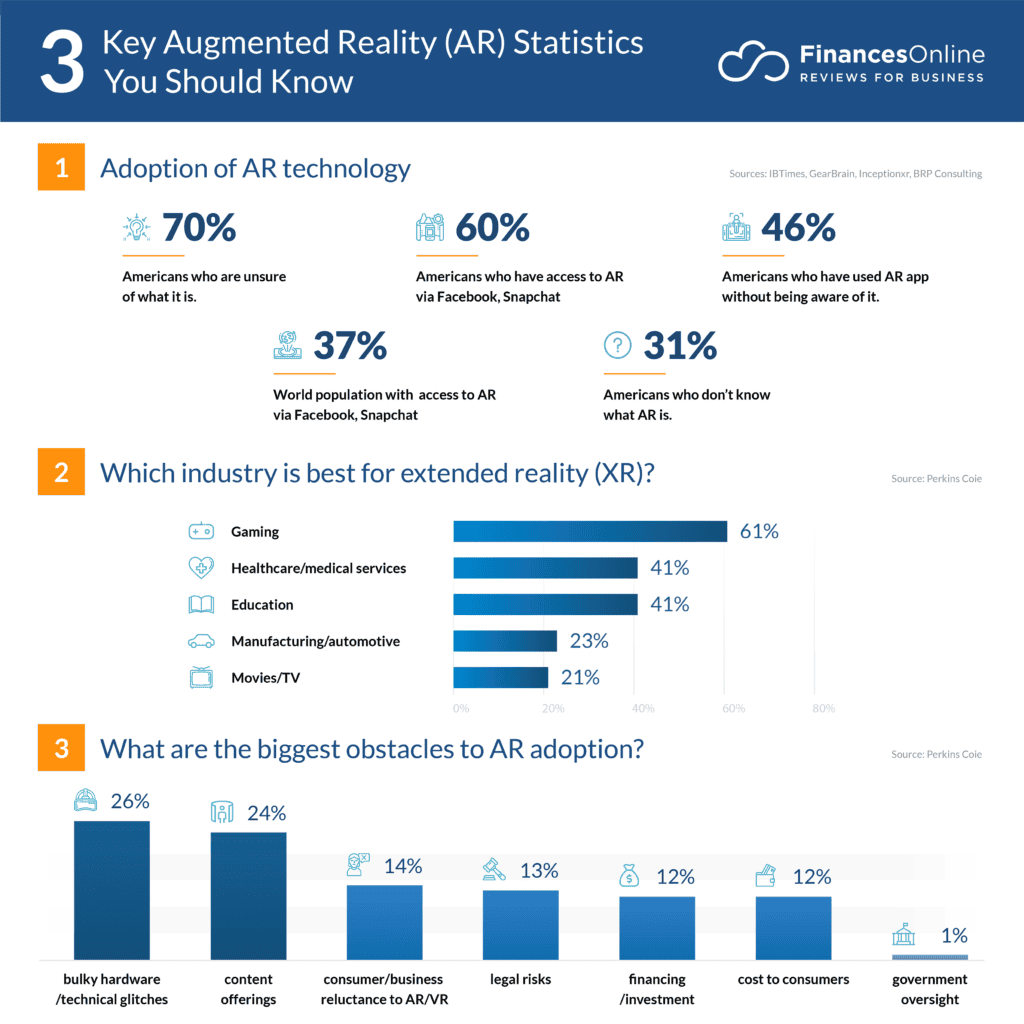
Companies that adopt 3D and AR early gain a distinct advantage. They’re perceived as more innovative, client-focused, and transparent – exactly the kind of suppliers B2B buyers are looking for today. Before we dive into real-world case studies from leading brands, below is a snapshot of current AR trends and market data.
Why Market Leaders Have Already Switched to 3D and Interactive Catalogs
Selling complex, customizable, or design-driven products today requires more than static photos. Interactive product catalogs using 3D visualization, AR, and configurators are no longer just a trend – they’re a proven tool for improving customer experience and driving sales.
Here’s how global brands are putting this into practice:
Nike: Real-time 3D customization
With its Nike By You platform, Nike enables users to build fully customized sneakers in a 3D environment. Customers can instantly see how changes to colors, materials, or design elements affect the final product. This level of interactivity not only enhances engagement – it shortens the decision cycle and builds loyalty.
IKEA: 3D and AR for complex interior choices
The IKEA Place app allows customers to visualize furniture in their own space using augmented reality. This is critical for purchases where size, space, and style alignment matter – and where a product photo simply doesn’t answer the question: “Will this actually fit in my room?”
L’Occitane: AR-powered product visualization
L’Occitane introduced an AR catalog that lets customers “try on” products virtually. For example, users can preview how a cream’s shade or texture looks on their skin before purchase. The system uses WebAR and AI for skin-type recognition, requires no app download, works across devices, and collects backend interaction data to power future personalization.
If companies with global reach are already using 3D and AR to make catalogs more interactive and tailored — it’s no longer a nice-to-have. It’s a competitive advantage.These approaches are setting the new UX standard in both B2B and B2C e-commerce.
Want to See How It Works?
We’ve prepared a short demo video of a 3D catalog for commercial kitchen equipment. Just send a request to marketing@codecave.pro – we’ll send it over.
Whether you're planning to launch:
- a 3D product catalog for your online store,
- an AR experience for B2B sales,
- an upgrade for complex product detail pages or a configurable catalog with accessories, we can help.
[Leave a request on our website – and we’ll schedule a free consultation.